
SignNow MCP Server: E-Signatures Straight from Claude Code


Key Takeaways
A few weeks ago we published a deep dive on integrating SignNow e-signatures into a Django application. That article covered the full server-side integration — OAuth2, document uploads, Celery tasks, webhooks — everything you need for a production signing workflow.
But we kept coming back to the same thought: what if you didn't need a web app at all? What if you could upload a contract, send it for signing, and check its status without ever leaving your terminal?
That's exactly what we built. Today we're open-sourcing signnow-mcp — a Model Context Protocol server that brings airSlate SignNow's e-signature capabilities directly into Claude Code.
What is MCP?
The Model Context Protocol (MCP) is an open standard that lets AI assistants like Claude interact with external tools and services. Think of it as a plugin system — you register an MCP server, and Claude gains new abilities.
In our case, those abilities are e-signatures.
What the server does
The signnow-mcp server exposes 11 tools that cover the full document lifecycle:
| Tool | What it does |
|---|---|
upload_document | Upload a PDF to SignNow |
get_document | Get document details and signing status |
list_documents | List all documents in the account |
download_signed_document | Download a signed PDF locally |
send_signing_invite | Send a freeform e-signature invite |
send_role_based_invite | Send a role-based invite with field assignments |
cancel_invite | Cancel pending signing invites |
add_signature_field | Add a signature field to a document |
list_templates | List all document templates |
create_from_template | Create a document from a template |
register_webhook | Register a webhook for document events |
Once connected, you interact with these tools through natural language. No API calls, no curl commands, no switching between browser tabs.
How it looks in practice
Here's what it looks like when you ask Claude Code to list your SignNow documents:
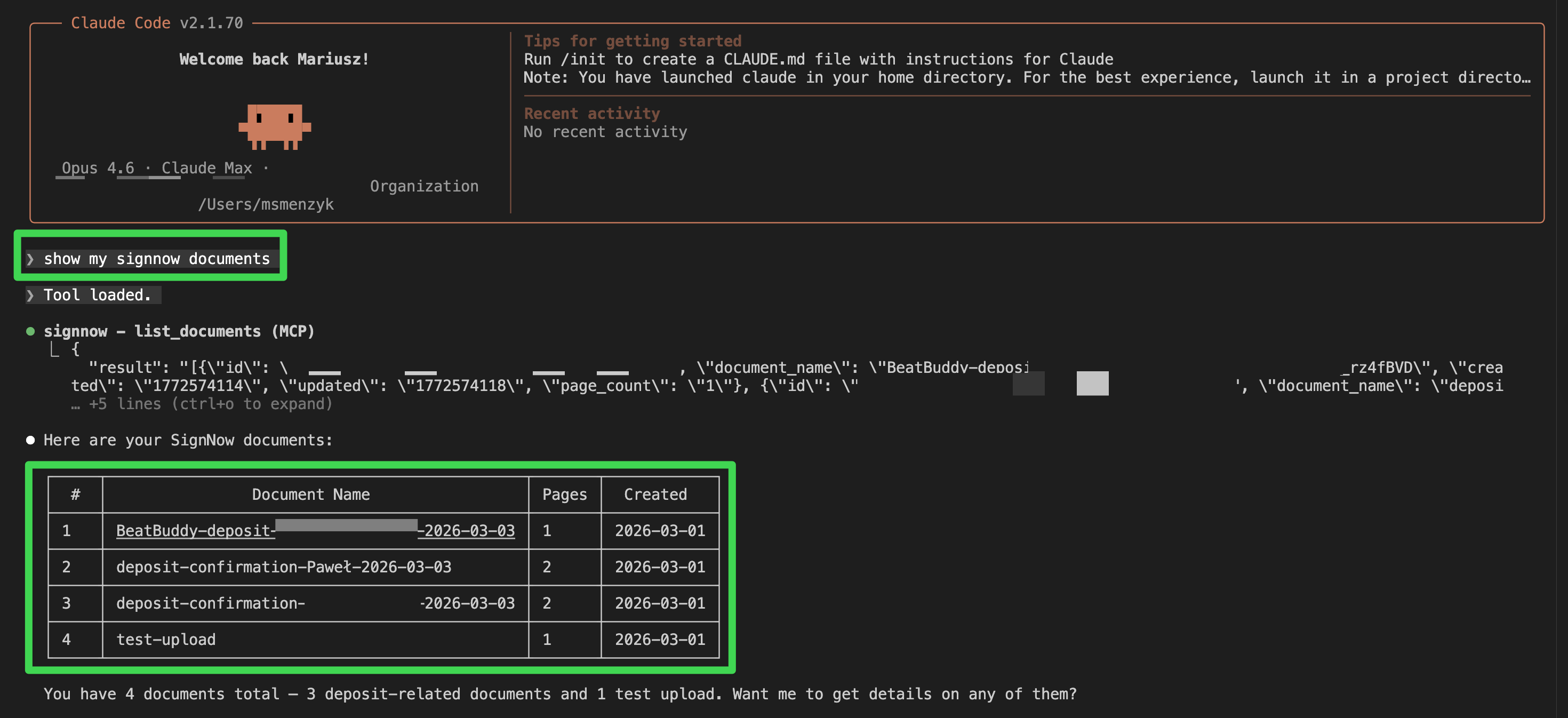
Claude calls the list_documents tool behind the scenes and presents the results in a clean table. You can then follow up with natural language — "download the first one", "send document #2 to john@example.com for signing", or "what's the status of the deposit confirmation?".
Setting it up
1. Get SignNow API credentials
- Create a SignNow account
- Go to API > Applications and create an application
- Note your
client_idandclient_secret - Base64-encode them:
echo -n "client_id:client_secret" | base64
2. Clone and install
git clone https://github.com/musictechlab/signnow-mcp.git
cd signnow-mcp
cp .env.example .env
# Edit .env with your credentials
poetry install
3. Register with Claude Code
The quickest way:
claude mcp add signnow -- poetry -C /path/to/signnow-mcp run python -m signnow_mcp.server
Or add it manually to your MCP configuration:
{
  "signnow": {
    "type": "stdio",
    "command": "poetry",
    "args": ["-C", "/path/to/signnow-mcp", "run", "python", "-m", "signnow_mcp.server"],
    "env": {
      "SIGNNOW_API_BASE_URL": "https://api.signnow.com",
      "SIGNNOW_BASIC_AUTH": "your-base64-encoded-credentials",
      "SIGNNOW_USERNAME": "your-email@example.com",
      "SIGNNOW_PASSWORD": "your-password"
    }
  }
}
https://api-eval.signnow.com) for testing. SignNow provides 2,000 free signature invites in sandbox mode.4. Start using it
Once configured, just talk to Claude:
- "Upload contract.pdf to SignNow and send it to john@example.com for signing"
- "Check the signing status of document abc123"
- "List all my SignNow documents"
- "Download the signed version of the NDA"
- "Create a new document from the deposit template and send it to the client"
Why we built this
At MusicTech Lab, we use SignNow for sending contracts, NDAs, and deposit confirmations as part of our BeatBuddy onboarding flow. Our Django integration handles the automated pipeline, but there are always ad-hoc tasks — checking a document's status, resending an invite, downloading a signed copy for the records.
Before the MCP server, that meant logging into the SignNow dashboard or writing one-off API calls. Now it's a single sentence in Claude Code.
Sandbox vs. production
SignNow provides separate environments for testing and production:
| Environment | API URL | App URL |
|---|---|---|
| Sandbox | https://api-eval.signnow.com | https://app-eval.signnow.com |
| Production | https://api.signnow.com | https://app.signnow.com |
Related resources
- GitHub: musictechlab/signnow-mcp — the source code
- Integrating SignNow E-Signatures into Your Django Application — our deep dive on the server-side integration
- Querying Bandcamp Revenue with Natural Language — another MCP server we built, this time for music revenue analytics
- Model Context Protocol specification — the MCP standard
- SignNow API documentation — official API reference
Need Help with This?
Building something similar or facing technical challenges? We've been there.
Let's talk — no sales pitch, just honest engineering advice.
Scratch Me – integration with the Copper CRM
A chrome plugin that increases productivity in a lead generation process by extracting the data from the post published on the Facebook social media platform
Music Industry Tech Openings (March 2024 Update)
When we decided to go all-in on the music industry, we knew from the start, that Bravelab team's support alone wouldn't be enough to drive the industry forward.
Related Articles




Technical Partner
Technical partner at MusicTech Lab with 15+ years in software development. Builder, problem solver, blues guitarist, long-distance swimmer, and cyclist.
Newsletter
Get music tech insights, case studies, and industry news delivered to your inbox.