
Querying Bandcamp Revenue Reports with Natural Language — Meet mtl-bandcamp-mcp

Key Takeaways
Every music label running on Bandcamp gets monthly CSV revenue reports. These files contain everything: gross revenue, net payouts, fee breakdowns, artist splits, and catalog details. But opening them in a spreadsheet means manual filtering, pivot tables, and context switching. We built mtl-bandcamp-mcp so you can query your Bandcamp earnings using natural language, without leaving the terminal.
Why We Built This
At MusicTech Lab, we built MusicData Lab - a music distribution and analytics product. As part of that platform, we wrote an adapter that ingests Bandcamp revenue reports into our data pipeline. It is not something we work on daily - Bandcamp is one of many data sources - but when a new CSV export arrives, we need quick answers without opening a spreadsheet. An MCP server turned out to be the perfect fit: it lets us query reports on demand and could eventually help us integrate and debug the adapter within the broader data pipeline:
Since we already use Claude Code for development, building an MCP server was the natural choice. We took a similar approach with our AI-powered analytics dashboard, where business users query streaming royalty data in plain English and get interactive charts back.
The Tools
mtl-bandcamp-mcp exposes five tools:
Dashboard Fields
Summary metrics
| Metric | Description |
|---|---|
| Items sold | Total quantity across all line items |
| Unique artists | Number of distinct artists in the report |
| Gross revenue | Total revenue before deductions |
| Net revenue | Revenue after all fees and taxes |
| Net margin | Net as a percentage of gross |
Fee breakdown
| Fee type | Description |
|---|---|
| Taxes | VAT and other taxes collected |
| Bandcamp share | Bandcamp's assessed revenue share |
| Collection society | Royalty collection society share |
| Payment processing | Payment processor fees |
| Shipping | Physical goods shipping costs |
Item detail
| Field | Description | Example |
|---|---|---|
| Cat no. | Catalog number | "MDL-2939" |
| UPC | Universal Product Code | "5060000000001" |
| ISRC | International Standard Recording Code | "GBAP01900028" |
| Item type | Track, album, or merch | "track" |
| Region | Buyer's region | "United Kingdom" |
How It Works in Practice
Once installed, you just talk to Claude Code. No spreadsheet formulas, no pivot tables, no context switching.
Viewing the dashboard
Ask Claude for a summary:
> Show me a summary of my latest Bandcamp revenue report
Claude finds the most recent CSV and returns a formatted dashboard:
Report: bandcamp-rev-report-2026-q1.csvPeriod: 2026-01-01 to 2026-03-31
| Metric | Value |
|---|---|
| Items sold | 847 |
| Line items | 312 |
| Unique artists | 24 |
| Gross revenue | 12,450.00 GBP |
| Total deductions | 3,290.75 GBP |
| Net revenue | 9,159.25 GBP |
| Net margin | 73.6% |
Checking artist splits
> Which artists earned the most this quarter?
Claude groups revenue by artist and shows each one's share:
| Artist | Items | Qty Sold | Gross | Net | Share |
|---|---|---|---|---|---|
| Solar Cole | 3 | 18 | 167.27 GBP | 129.38 GBP | 53.9% |
| The Fox Alliance | 1 | 6 | 64.55 GBP | 53.11 GBP | 22.1% |
| Midnight Storm | 1 | 4 | 33.57 GBP | 28.81 GBP | 12.0% |
| Iris Grove | 2 | 2 | 16.80 GBP | 11.72 GBP | 4.9% |
Finding top sellers
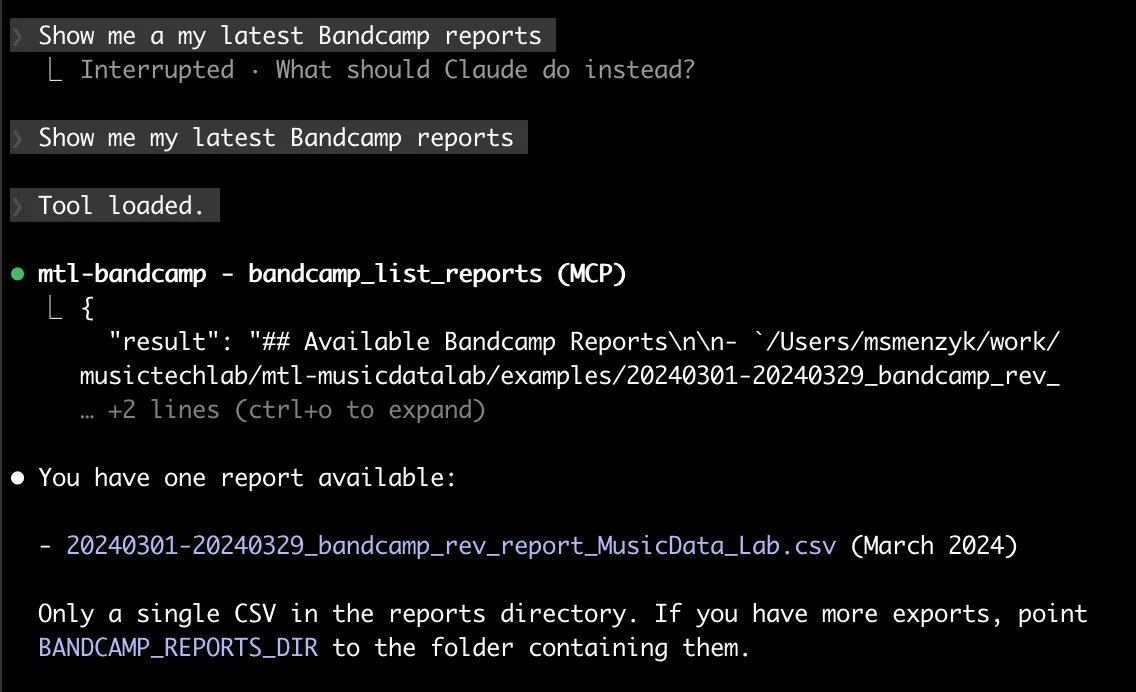
> What are the top 5 items by quantity sold?
| # | Item | Artist | Type | Qty | Gross | Net |
|---|---|---|---|---|---|---|
| 1 | The Little Fantasies | Solar Cole | album | 9 | 83.87 GBP | 64.31 GBP |
| 2 | Short Dreams | The Fox Alliance | album | 6 | 64.55 GBP | 53.11 GBP |
| 3 | The Open Offerings | Solar Cole | album | 6 | 55.02 GBP | 44.01 GBP |
| 4 | The Broad Chorus | Midnight Storm | album | 4 | 33.57 GBP | 28.81 GBP |
| 5 | Premier Visions | Solar Cole | album | 3 | 28.38 GBP | 21.06 GBP |
You can sort by net, gross, or quantity and set any limit.
Looking up a specific item
> Show me all the details for catalog number MDL-2939
Claude returns every field for that item: UPC, ISRC, region, item type, and a full fee breakdown.
More prompt ideas
Here are some real-world prompts you can try. Click each one to see the result:
List all available Bandcamp reports
What are the top 5 items by quantity sold?
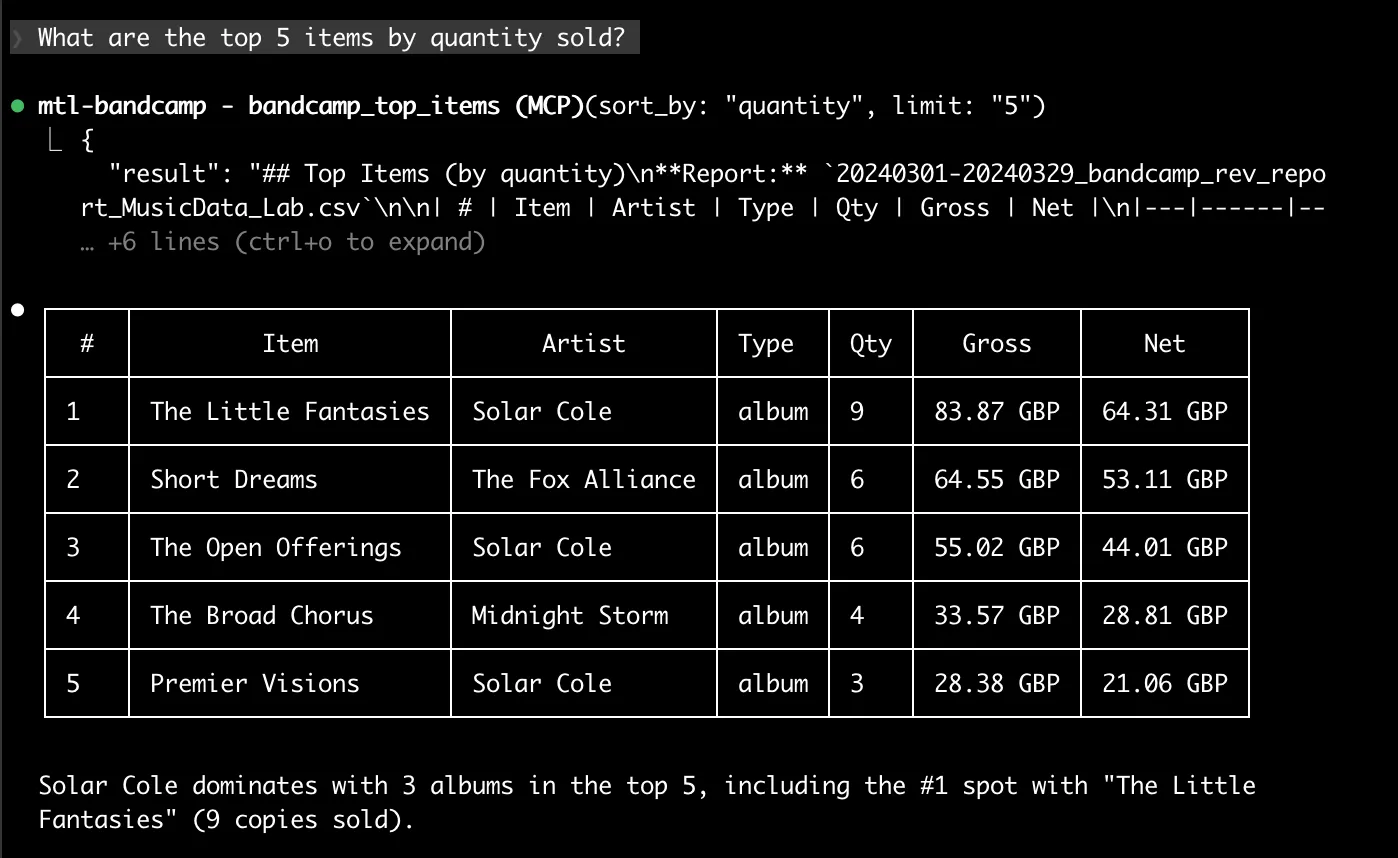
How much did we pay in Bandcamp fees this quarter?
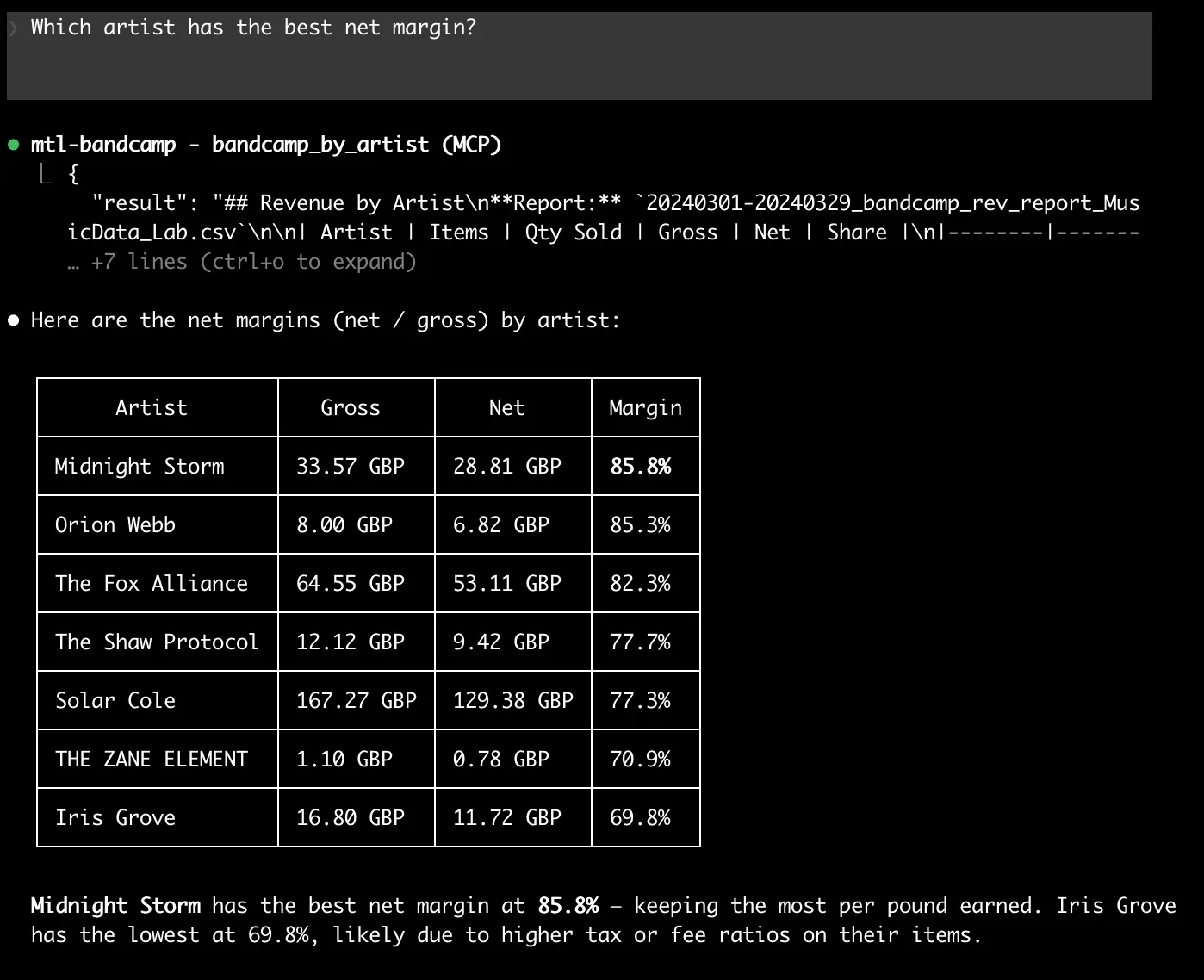
Which artist has the best net margin?
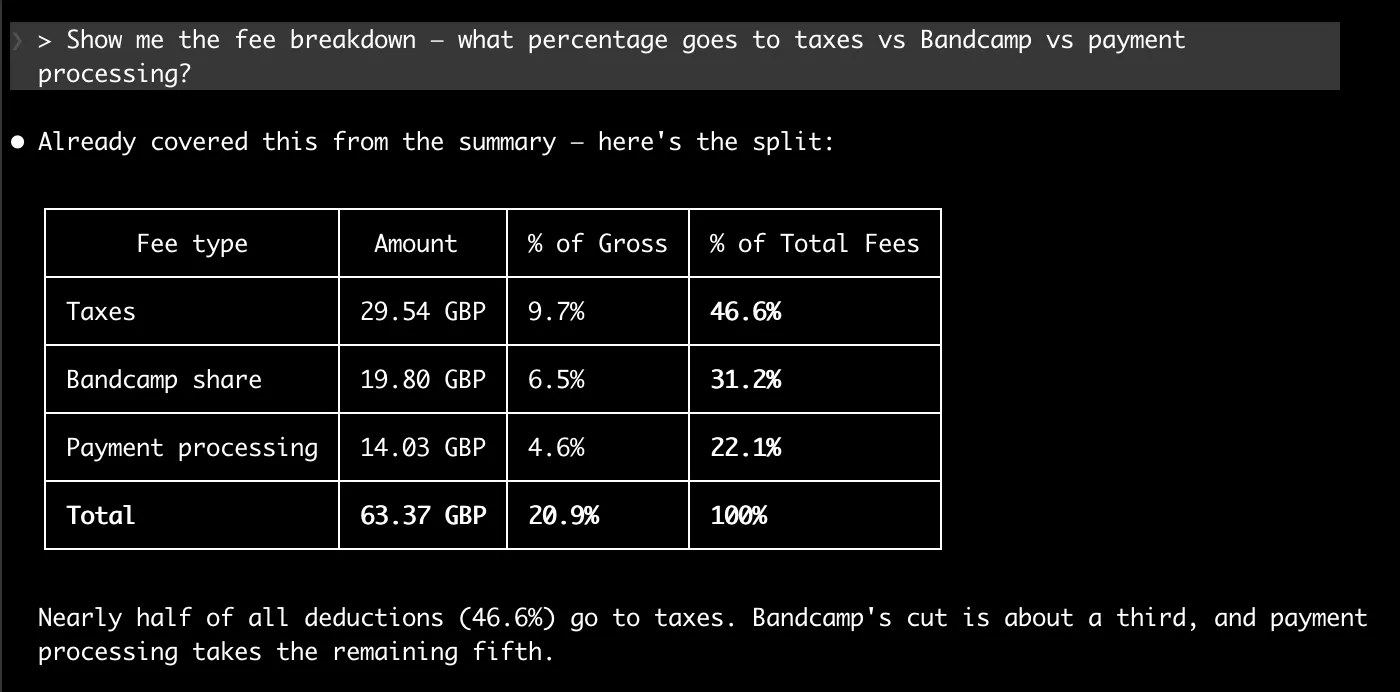
Show me the fee breakdown — what percentage goes to taxes vs Bandcamp vs payment processing?
Visualizing the data
You can also generate charts from the report data. Just ask:
> Show me which artists earned the most as a chart
Loading diagram...
> Show me the revenue share breakdown as a pie chart
Loading diagram...
> What percentage of fees goes to taxes vs Bandcamp vs payment processing?
Loading diagram...
All charts are rendered inline, with the site's dark theme and brand styling. No spreadsheet, no BI tool, no context switching.
Handling Bandcamp's CSV Format
Bandcamp exports revenue reports in UTF-16 encoding by default, which trips up most CSV parsers. mtl-bandcamp-mcp handles this transparently - it tries UTF-16 first, then falls back to UTF-8-sig and UTF-8. You never have to think about encoding issues.
Tech Stack
The entire codebase is a single server module with clean, focused logic.
Getting Started
Installation
git clone https://github.com/musictechlab/mtl-bandcamp-mcp.git
cd mtl-bandcamp-mcp
poetry install
Register with Claude Code
claude mcp add -s user mtl-bandcamp -- bash -c "cd /path/to/mtl-bandcamp-mcp && poetry run python -m mtl_bandcamp_mcp"
Configuration
Set BANDCAMP_REPORTS_DIR to point to the directory containing your Bandcamp CSV exports:
export BANDCAMP_REPORTS_DIR=~/Documents/bandcamp-reports
Restart Claude Code, and all five tools are available immediately.
claude mcp list - look for mtl-bandcamp in the output.What is Next
This is version 0.1.0. Here is what we are considering for future releases:
Have an idea for a feature we have not thought of? We would love to hear it. Let's connect and shape the roadmap together.
Open Source
mtl-bandcamp-mcp is MIT licensed and available on GitHub:
github.com/musictechlab/mtl-bandcamp-mcp
Contributions, issues, and feature requests are welcome. If you run a label on Bandcamp and want to streamline your revenue reporting, give it a try and let us know what you think.
Let's Build Something Together
Have a similar project in mind? We'd love to hear about it.
Get in touch to discuss how we can help bring your vision to life.
Maintaining Music Tech Tools: The SLA Dilemma for Small Teams
What happens when a custom streaming analytics tool works perfectly, until nobody is responsible for keeping it running. A real story from the music industry.
mtl-metadata-mcp: Open Source Audio Metadata Embedding for Claude Code
We built an open source MCP server that reads and writes metadata tags in MP3, FLAC, and OGG files directly from Claude Code. Here is how it works.
Related Articles




Technical Partner
Technical partner at MusicTech Lab with 15+ years in software development. Builder, problem solver, blues guitarist, long-distance swimmer, and cyclist.
Newsletter
Get music tech insights, case studies, and industry news delivered to your inbox.