
Connecting Your Max for Live Device to a Cloud API

Key Takeaways
Introduction
In our previous article, we built a Max for Live device that exports arrangement locators to JSON. The data stayed local - displayed in the device UI or saved to a file.
Now let's take it further: sending that data to a cloud API where it can be stored, visualized, and integrated with other tools.
Why Connect to an API?
Local JSON files are useful, but they have limitations:
| Local Files | Cloud API |
|---|---|
| Manual file management | Automatic storage |
| Single machine access | Access from anywhere |
| No version history | Full export history |
| No visualization | Browser-based timeline view |
| Manual sharing | Team collaboration |
By connecting your Max for Live device to an API, every export becomes part of a searchable, visualized database.
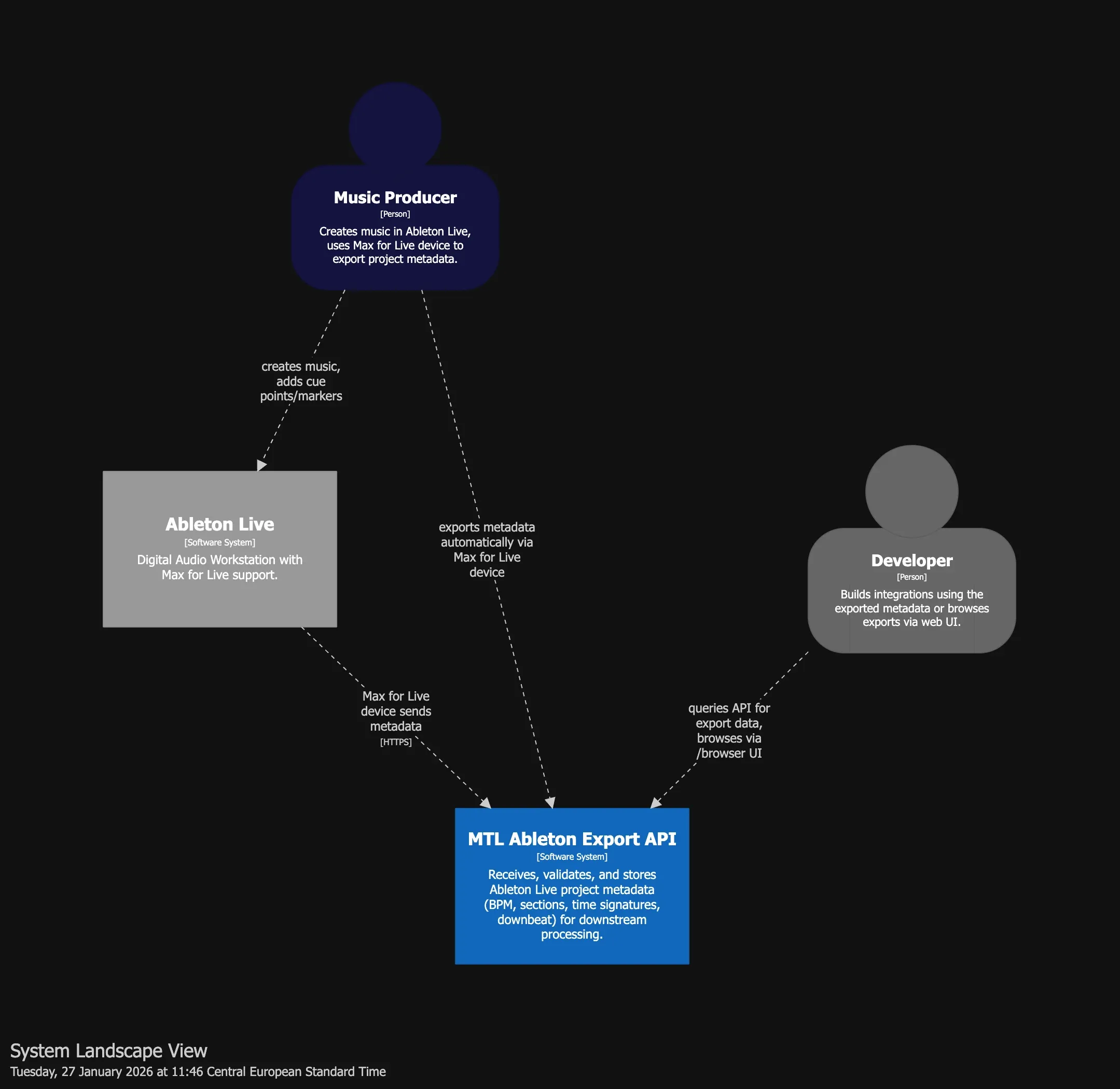
Architecture Overview (C4 Model)
We use the C4 model to document the system architecture. Here's the System Landscape showing all actors and systems:
And the Container View showing internal components:
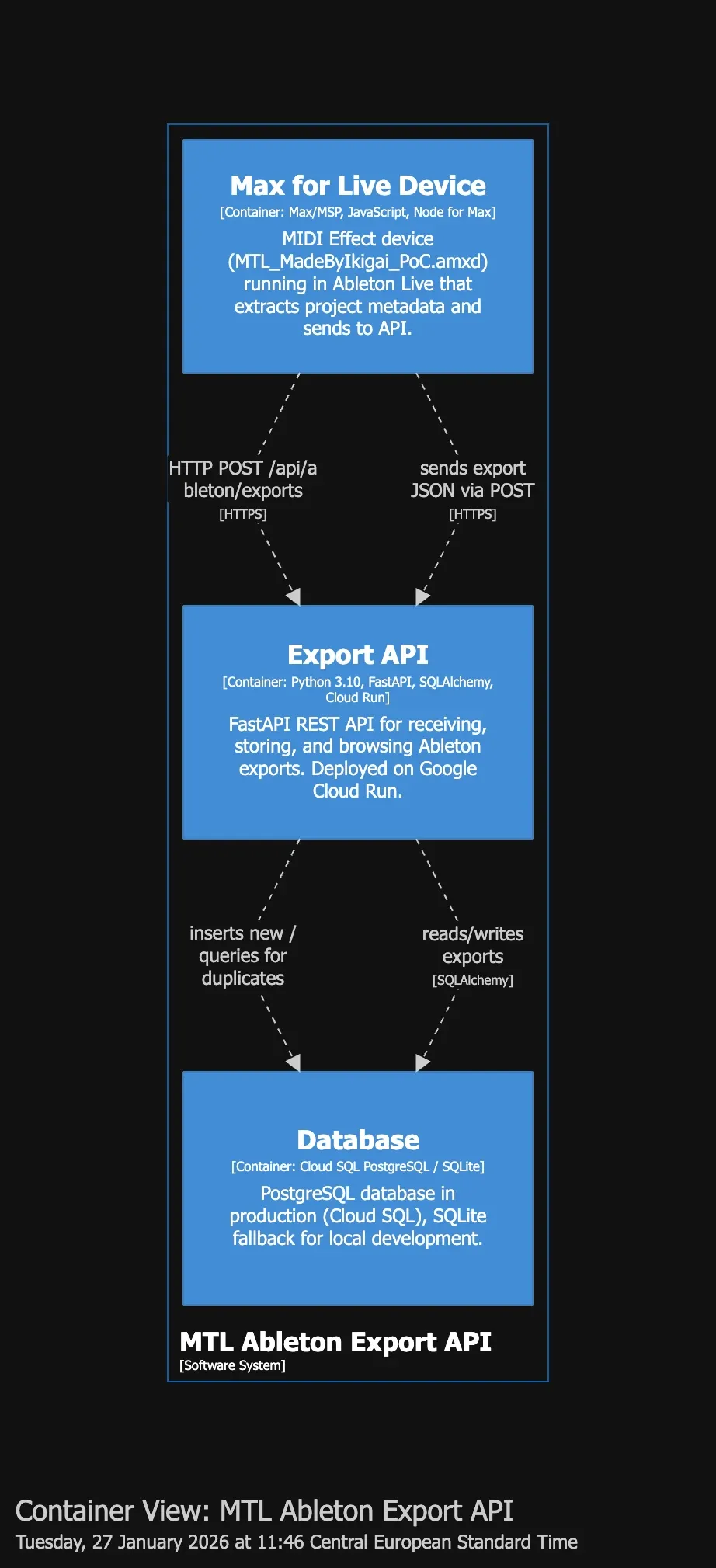
Key Components
| Container | Technology | Responsibility |
|---|---|---|
| Max for Live Device | JavaScript, Node for Max | Extracts metadata from Ableton, sends to API |
| Export API | FastAPI, Cloud Run | Receives, validates, stores exports |
| Database | PostgreSQL (Cloud SQL) | Persistent storage with JSON sections |
The API: Receiving Ableton Exports
Our API is built with FastAPI and deployed on Google Cloud Run. Here's the core endpoint:
POST /api/ableton/exports
Receives and stores project metadata from Ableton Live.
Request Schema:
{
  "project": "my_track",
  "bpm": 103.34,
  "time_signature": {
    "numerator": 4,
    "denominator": 4
  },
  "downbeat_seconds": 0,
  "sections": [
    { "label": "INTRO", "time_seconds": 0 },
    { "label": "VERSE", "time_seconds": 16 },
    { "label": "CHORUS", "time_seconds": 48 }
  ],
  "exported_at": "2026-01-27T14:30:00Z",
  "file_path": "/Users/producer/Music/my_track.als"
}
Response:
{
  "id": "550e8400-e29b-41d4-a716-446655440000",
  "project_name": "my_track",
  "bpm": 103.34,
  "time_signature": { "numerator": 4, "denominator": 4 },
  "downbeat_seconds": 0,
  "sections": [...],
  "exported_at": "2026-01-27T14:30:00Z",
  "created_at": "2026-01-27T14:30:05Z",
  "is_duplicate": false
}
Idempotency
The API is idempotent - if you accidentally export the same project twice with the same timestamp, it returns the existing record with is_duplicate: true instead of creating a duplicate.
Extending the Max for Live Device
Now let's modify our JavaScript to send data to the API.
The Challenge: Max for Live HTTP Requests
Max for Live's JavaScript environment doesn't have native fetch() or XMLHttpRequest. Instead, we use the jweb or maxurl objects, or - the simplest approach - shell out to curl.
Core Logic (marker_export.js)
The JavaScript extends our previous export script with API communication:
// Pseudo-code: marker_export.js

function bang() {
  // 1. Get project data from Live via LiveAPI
  song = new LiveAPI("live_set")

  name = song.get("name")           // Project name
  bpm = song.get("tempo")           // BPM
  sigNum = song.get("signature_numerator")
  sigDen = song.get("signature_denominator")

  // 2. Collect all locators (cue points)
  locatorIds = song.get("cue_points")
  sections = []

  for each locatorId:
    locator = new LiveAPI("id " + locatorId)
    sections.push({
      label: locator.get("name"),      // "INTRO", "VERSE", etc.
      time_seconds: locator.get("time") // Position in seconds
    })

  // 3. Build payload matching API schema
  payload = {
    project: name,
    bpm: bpm,
    time_signature: { numerator: sigNum, denominator: sigDen },
    sections: sections,
    exported_at: now()
  }

  // 4. Display in UI + send to API
  outlet(0, JSON.stringify(payload))  // → textedit (preview)
  outlet(1, payload)                   // → node.script (API sender)
}
Key insight: LiveAPI returns arrays for most properties, so always handle Array.isArray() checks.
Alternative: Using node.script
For a more robust solution, use the node.script object which runs a Node.js script directly within Max:
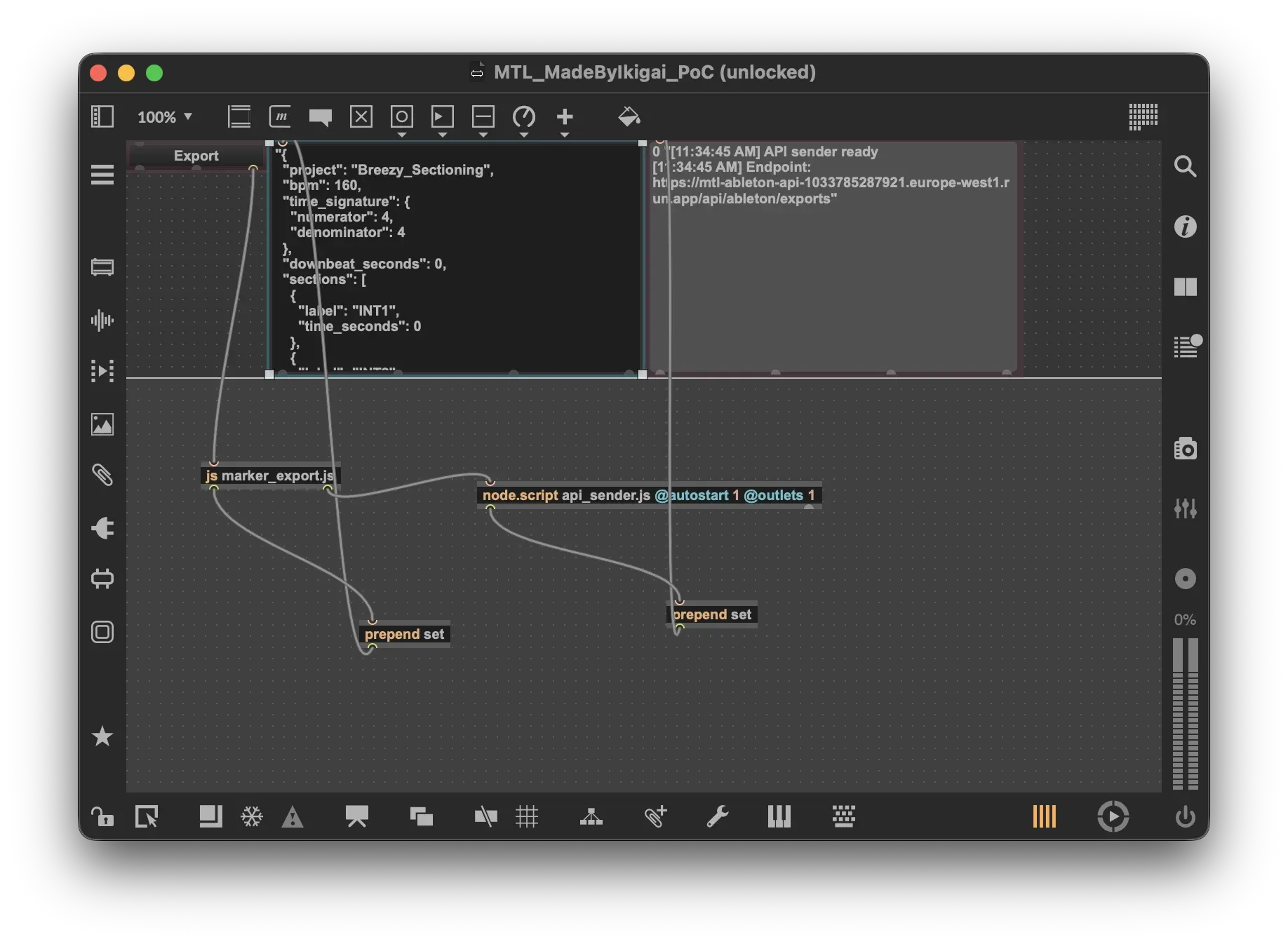
The patcher architecture:
┌─────────────────┐     ┌──────────────────────┐     ┌────────────────┐
│   textbutton    │────▶│  js marker_export.js │────▶│   textedit     │
│    "Export"     │     │                      │     │  (JSON output) │
└─────────────────┘     └──────────┬───────────┘     └────────────────┘
                                   │
                                   ▼
                        ┌──────────────────────────────────────┐
                        │  node.script api_sender.js           │
                        │  @autostart 1 @outlets 1             │
                        └──────────────────┬───────────────────┘
                                           │
                                           ▼
                                 ┌────────────────┐
                                 │   textedit     │
                                 │ (API status)   │
                                 └────────────────┘
The node.script object runs a Node.js script within Max, providing full access to npm packages and modern JavaScript features.
The API Sender (api_sender.js)
The node.script object runs a Node.js script that handles HTTP communication:
// Pseudo-code: api_sender.js

const Max = require('max-api');
const API_URL = "https://your-api.run.app/api/ableton/exports";

Max.addHandler("export", async (jsonString) => {
  // 1. Parse incoming data from marker_export.js
  const payload = JSON.parse(jsonString);

  // 2. POST to API
  const response = await fetch(API_URL, {
    method: 'POST',
    headers: { 'Content-Type': 'application/json' },
    body: JSON.stringify(payload)
  });

  // 3. Handle response
  const result = await response.json();

  if (result.is_duplicate) {
    Max.outlet("status", "Already exported");
  } else {
    Max.outlet("status", "Saved: " + result.id);
  }
});
Why node.script? Unlike Max's built-in JS, node.script provides full Node.js runtime with npm packages, async/await, and modern fetch API.
The API Implementation
The backend is a FastAPI service with PostgreSQL storage:
# Pseudo-code: FastAPI endpoint

@router.post("/ableton/exports")
async def create_export(data: AbletonExportSchema, db: Session):

    # 1. Idempotency check - prevent duplicates
    existing = db.query(Export).filter(
        project == data.project,
        exported_at == data.exported_at
    ).first()

    if existing:
        return { ...existing, is_duplicate: True }

    # 2. Store new export
    export = Export(
        id = uuid4(),
        project_name = data.project,
        bpm = data.bpm,
        sections = data.sections,    # JSON array
        exported_at = data.exported_at
    )

    db.add(export)
    db.commit()

    return { ...export, is_duplicate: False }
Key design decisions:
- Idempotency via unique constraint on
(project_name, exported_at) - Sections stored as JSON for flexibility
- UUID primary keys for distributed systems compatibility
Browser UI: Visualizing Your Exports
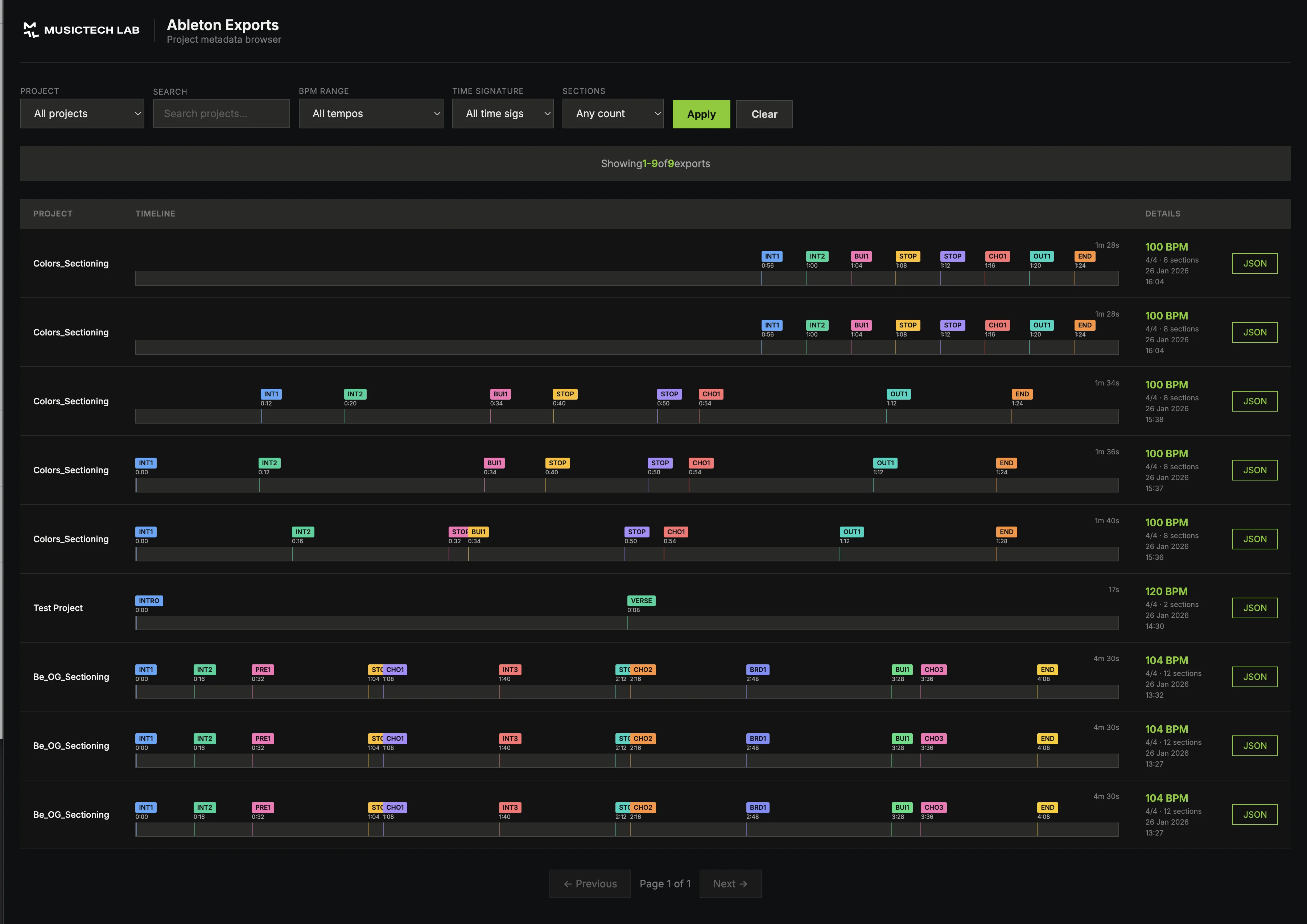
The API includes a browser-based UI at /browser that shows all your exports:
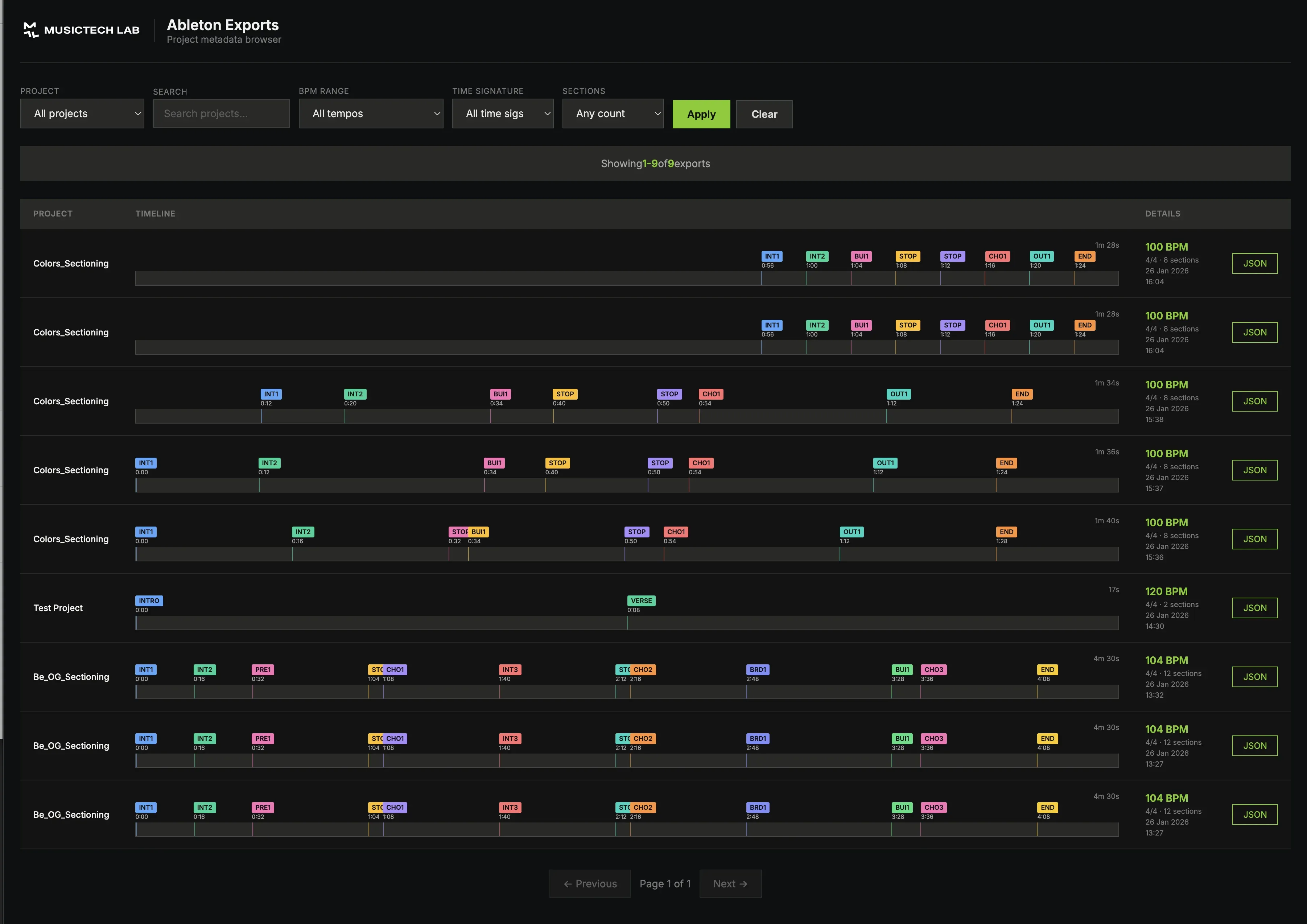
Features
| Feature | Description |
|---|---|
| Timeline visualization | Ableton-style arrangement view |
| Filters | By project, BPM range, section count |
| Search | Find exports by name |
| Pagination | Handle large export histories |
| JSON inspection | Click to see full export data |
Timeline Rendering
Each export is visualized as a horizontal timeline with color-coded sections:

The visualization is generated client-side using vanilla JavaScript and CSS Grid, making it lightweight and fast.
Additional API Endpoints
GET /api/ableton/exports
List all exports with pagination and filtering:
curl "https://api.example.com/api/ableton/exports?project=my_track&page=1&limit=20"
GET /api/ableton/exports/{id}
Get a specific export by ID:
curl "https://api.example.com/api/ableton/exports/550e8400-e29b-41d4-a716-446655440000"
GET /api/ableton/projects
Get list of all unique project names:
curl "https://api.example.com/api/ableton/projects"
Response:
{
  "projects": ["my_track", "remix_v2", "collab_final"]
}
Deployment
The API runs on Google Cloud Run with Cloud SQL (PostgreSQL):
| Component | Service |
|---|---|
| API | Cloud Run (serverless containers) |
| Database | Cloud SQL PostgreSQL |
| Region | europe-west1 |
Local development uses Docker Compose with the same PostgreSQL setup, ensuring dev/prod parity.
Testing the Integration
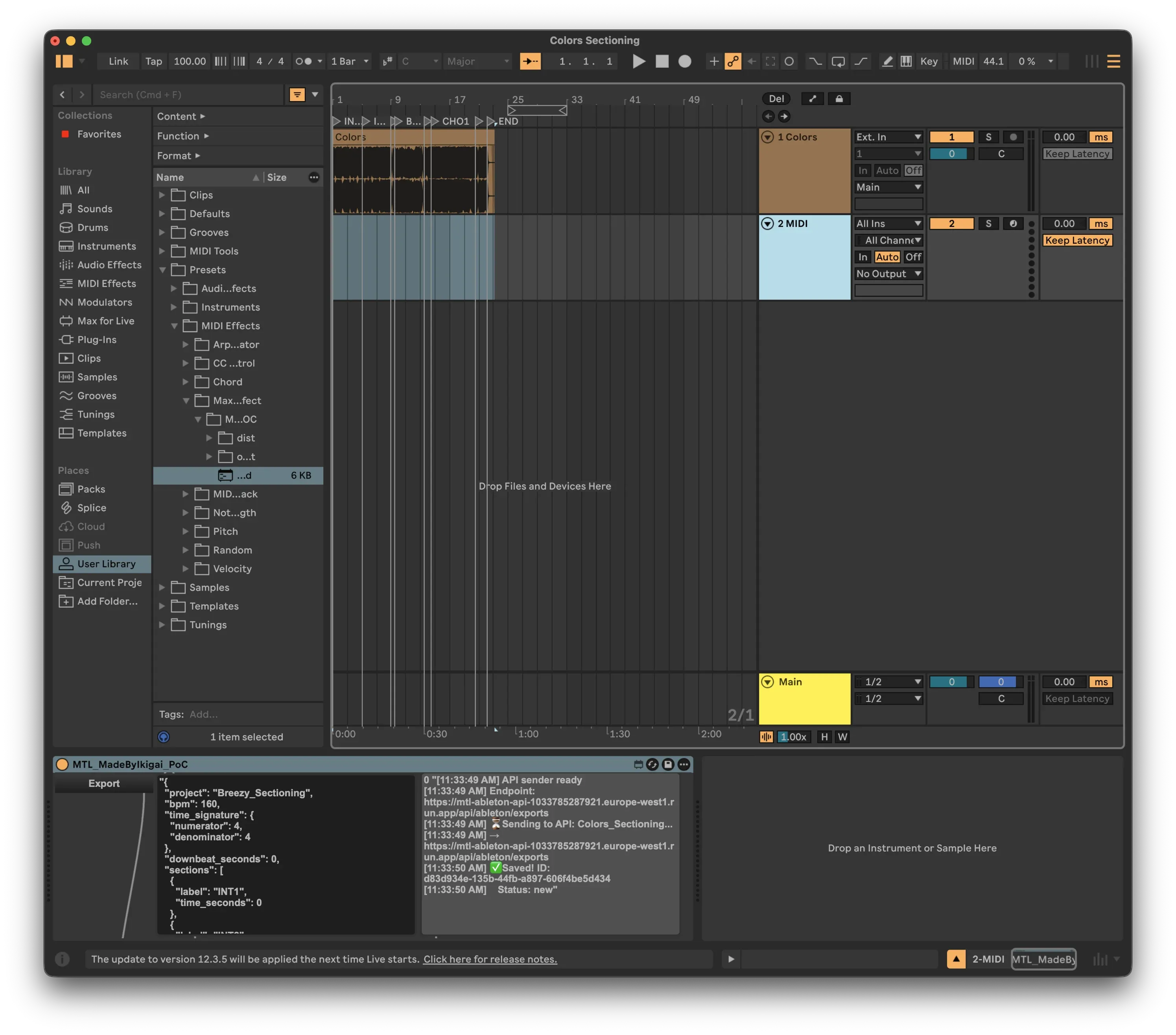
From Ableton
- Open a project with arrangement locators
- Add the Max for Live device to any MIDI track
- Click "Export"
- Watch the status panel - should show "Saved: uuid"
- Open Browser UI - your export appears in the timeline
Verify with curl
curl "https://your-api.run.app/api/ableton/projects"
# Returns: { "projects": ["your_project_name", ...] }
Security Considerations
For a production deployment, consider:
| Concern | Solution |
|---|---|
| Authentication | Add API keys or OAuth |
| Rate limiting | Prevent abuse |
| CORS | Restrict allowed origins |
| Input validation | Already handled by Pydantic |
| HTTPS | Enforced by Cloud Run |
What's Next?
This pipeline enables several advanced workflows:
- AI comparison - Compare manual annotations with AI-detected structures
- Cross-DAW sync - Export from Ableton, import to REAPER/Logic
- Version tracking - See how your arrangement evolved over time
- Team collaboration - Share structure data with collaborators
- Automated processing - Trigger downstream tasks on new exports
Related Articles
- Exporting Ableton Live Locators to JSON with Max for Live - Build the Max for Live device
- Automatic Song Structure Analysis – How AI Detects Intro, Verse, and Chorus - AI-powered structure detection
Conclusion
By connecting your Max for Live device to a cloud API, you transform Ableton from an isolated creative tool into a node in a larger data pipeline. Every arrangement decision, every locator you place, becomes structured data that can power visualizations, training datasets, and cross-platform workflows.
The key insight: your DAW is a data source. Treating it that way opens up possibilities that weren't available when everything stayed local.
Need Help with This?
Building something similar or facing technical challenges? We've been there.
Let's talk — no sales pitch, just honest engineering advice.
Communication Channels in Remote Work
A comparison of communication channels for remote teams. Explore the best platforms to keep your distributed workforce connected and productive.
From Voice Memo to Studio: The Cross-Platform Problem for Creators
Ideas happen anywhere — rehearsal room, commute, studio. But syncing between devices is manual and error-prone. Offline support and conflict resolution are nonexistent.
Related Articles



Technical Partner
Technical partner at MusicTech Lab with 15+ years in software development. Builder, problem solver, blues guitarist, long-distance swimmer, and cyclist.
Newsletter
Get music tech insights, case studies, and industry news delivered to your inbox.